
Have you ever found the perfect image for your content only to realize it’s too small or blurry to use?
This happens more often than many creators expect. An old blog graphic, a screenshot from a video, a client logo, or a photo taken years ago may contain valuable information but lack the quality needed for today’s high-resolution screens.
In the past, improving these images usually meant accepting blurry results or recreating everything from scratch. Today, artificial intelligence offers a much better alternative.
An AI image upscaler analyzes an image, predicts missing details, and increases its resolution while preserving sharpness and visual quality. Instead of simply stretching pixels, modern AI models generate new details that make images look clearer and more natural.
For content creators, this technology saves time and protects valuable work that would otherwise need to be redesigned. Whether you’re preparing YouTube thumbnails, blog graphics, social media posts, presentation slides, or marketing materials, improving image quality can make your content look more professional without requiring advanced editing skills.
In this guide, you’ll learn how AI image upscalers work, when to use them, their advantages and limitations, and how they fit into an efficient content creation workflow.
What Is an AI Image Upscaler?
An AI image upscaler is a tool that increases the resolution of an image using artificial intelligence instead of traditional image enlargement techniques.
Conventional resizing software simply stretches existing pixels. While this makes the image larger, it often introduces blur, jagged edges, and a noticeable loss of detail.
AI approaches the problem differently.
Instead of copying pixels, machine learning models analyze patterns, textures, edges, lighting, and shapes. Based on what they have learned from millions of images, these models predict what missing details should look like and generate new pixels that blend naturally with the original image.
The result is often a higher-resolution version that appears sharper and more detailed than a standard enlargement.
This technology is useful for many types of visual content, including:
- Blog featured images
- YouTube thumbnails
- Social media graphics
- Product photos
- Presentation slides
- Website banners
- Digital illustrations
- Scanned photographs
- Screenshots
- Marketing materials
For creators who regularly work with images, AI upscaling has become part of the content production process rather than a specialized editing technique.
Why Image Quality Matters More Than Ever
Visual quality influences how people perceive your content within seconds.
Before reading an article or watching a video, visitors often judge its credibility based on the images they see. A blurry thumbnail, pixelated illustration, or low-resolution banner can make otherwise valuable content appear outdated or unfinished.
This doesn’t mean every image must be professionally photographed. It simply means your visuals should match the overall quality of your work.
Content creators frequently face situations like these:
- Reusing graphics from older projects.
- Downloading archived images with limited resolution.
- Capturing screenshots from tutorials or webinars.
- Enlarging logos for presentations.
- Creating thumbnails from video frames.
- Updating blog posts written years earlier.
In each case, the original image may still be useful, but its resolution no longer meets modern expectations.
Rather than replacing every visual, an AI image upscaler allows creators to improve image quality while preserving the original design, colors, and composition.
The result is a more polished experience for readers, viewers, and clients, without adding unnecessary work to the production process.
How AI Image Upscalers Work
Although the results may seem almost magical, AI image upscaling follows a structured process.
Instead of simply enlarging an image, artificial intelligence analyzes its visual elements, predicts missing details, and reconstructs the image at a higher resolution.
The workflow usually looks like this:
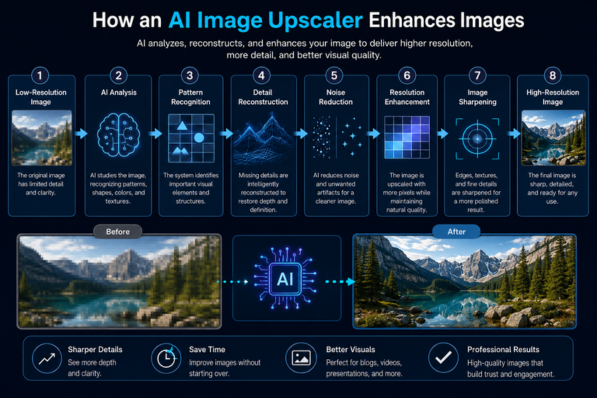
Unlike traditional resizing methods, AI generates new visual information instead of stretching existing pixels. This allows creators to enlarge images while maintaining better clarity, sharper edges, and more natural textures.
The exact process varies between tools, but the goal is always the same: produce a cleaner, more detailed image without requiring manual editing.
Organizations such as Google AI continue researching machine learning techniques that improve image processing, computer vision, and other AI applications used across creative industries.
Benefits of Using an AI Image Upscaler
For many creators, image quality directly affects how professional their content appears.
An AI image upscaler helps improve visual assets while reducing the time spent recreating graphics from scratch.
Some of the biggest advantages include:
The comparison below shows how AI image upscalers help creators save time while producing sharper, more professional visuals.
| Without AI Upscaling | With AI Upscaling |
| Blurry enlarged images | Sharper, cleaner visuals |
| Manual image recreation | Faster content production |
| Loss of fine details | Better texture preservation |
| Low-quality thumbnails | Professional-looking graphics |
| Limited use of older images | Reuse valuable visual assets |
These improvements become especially valuable when working with large content libraries or publishing frequently across multiple platforms.
Instead of replacing old visuals, creators can refresh existing assets and maintain a consistent visual identity.
When Content Creators Should Use an AI Image Upscaler
Not every image needs enhancement, but there are many situations where AI upscaling can make a noticeable difference.
For example, bloggers often update older articles with larger featured images that fit modern website layouts. Rather than searching for replacements, they can improve the quality of existing graphics.
YouTube creators frequently capture thumbnails directly from video frames. While these screenshots may communicate the right message, increasing their resolution can make titles, faces, and visual elements appear much clearer.
Social media creators also benefit from AI upscaling when adapting content for different platforms. A single image may need several sizes, and maintaining quality across all versions helps preserve a professional appearance.
Other common use cases include:
- Restoring archived project images.
- Improving screenshots for tutorials.
- Enlarging product photos for online stores.
- Preparing high-quality presentation graphics.
- Updating marketing materials.
- Reusing historical photos in educational content.
- Enhancing scanned documents or illustrations.
In many of these cases, the original image already contains valuable information. AI simply helps present it in a cleaner, more effective way.
If you also create presentations for clients or educational content, an AI Presentation Maker can help organize information while high-quality visuals make every slide look more professional.
AI Upscaling Is About More Than Bigger Images
Many people assume that image upscaling is only about increasing size.
In reality, the biggest benefit is often improving usability.
A clearer image is easier to read, more visually appealing, and better suited for modern displays with higher resolutions.
For content creators, this means spending less time redesigning graphics and more time creating new content.
High-quality visuals also contribute to a stronger brand identity. When blog posts, videos, presentations, and social media graphics maintain a consistent level of quality, audiences are more likely to view the creator as trustworthy and professional.
Rather than replacing creativity, AI image upscalers support it by helping creators get more value from the work they have already produced.
How to Choose the Right AI Image Upscaler
Not every AI image upscaler produces the same results. Some prioritize speed, while others focus on preserving textures, reducing noise, or supporting professional workflows.
Instead of choosing a tool based only on popularity, consider what best fits your content needs.
Here are a few aspects worth evaluating:
- Image quality: Does the enhanced image look natural, or does it introduce artifacts?
- Maximum resolution: Some tools support much larger outputs than others.
- Supported file formats: Make sure it works with the image types you use most often.
- Processing speed: Faster results can be important for creators working with multiple projects.
- Privacy: If you work with client files or confidential material, check how uploaded images are handled.
- Export options: Flexible download formats make it easier to continue editing when needed.
The best choice depends less on finding the “perfect” tool and more on selecting one that fits your workflow consistently.
Common Mistakes When Upscaling Images
AI can improve image quality, but it isn’t a magic solution for every situation.
One of the most common mistakes is expecting artificial intelligence to completely restore images that have lost too much information. Extremely blurry or heavily compressed files may improve, but they rarely become perfect.
Another frequent mistake is enlarging an image far beyond its intended purpose. Increasing resolution several times can sometimes create artificial textures or details that don’t look realistic.
Creators should also avoid processing the same image repeatedly. Running an already enhanced image through multiple upscaling cycles may gradually reduce its natural appearance.
Other mistakes include:
- Using low-quality source images whenever better versions are available.
- Ignoring small visual artifacts after enhancement.
- Assuming every image benefits from maximum sharpening.
- Forgetting to compare the enhanced version with the original.
Reviewing the final image before publishing remains an important step, even when AI performs most of the work.
Best Practices for Better Results
Getting high-quality results often depends more on the starting image than on the software itself.
Whenever possible, begin with the highest-resolution version you have. Even if it isn’t perfect, providing more visual information gives AI better material to analyze.
It also helps to define the image’s final purpose before enhancing it. A blog banner, a YouTube thumbnail, and a printed presentation may require different output sizes.
Many creators achieve more natural results by making subtle improvements rather than applying the strongest available settings.
A few simple habits can make a noticeable difference:
- Save the original file before making changes.
- Compare the enhanced version side by side with the original.
- Zoom in to inspect fine details before publishing.
- Keep colors and lighting consistent across your visual content.
- Organize improved images in clearly labeled folders for future projects.
These small practices help maintain a consistent visual identity across all your content.
How AI Image Upscalers Fit Into a Modern Content Workflow
Image enhancement is no longer an isolated task. For many creators, it has become one step within a larger AI-assisted production process.
A typical workflow might begin with researching ideas, followed by writing scripts or articles, creating visuals, improving image quality, and finally publishing the finished content.
Many creators also use AI Transcription tools to convert interviews, meetings, and voice recordings into searchable text before designing visual assets for their projects.
For example, a blogger might use AI to outline an article, generate supporting graphics, upscale an older featured image, and prepare presentation slides for social media promotion.
Similarly, a YouTube creator could improve a thumbnail taken from a video frame, making facial expressions, text, and visual elements appear clearer before publishing.
Rather than replacing creativity, AI image upscalers help creators spend less time fixing technical limitations and more time developing ideas that connect with their audience.
Better results also depend on giving AI clear instructions. Learning why Prompt Quality Matters helps creators generate more accurate text, images, and creative assets throughout the production process.
As AI tools continue to evolve, image enhancement is becoming a natural part of efficient content creation, alongside writing assistants, transcription tools, voice generation, and other productivity solutions.
The Future of AI Image Upscaling
Image enhancement has advanced rapidly over the last few years, and it continues to evolve alongside other AI-powered creative tools.
Future image upscalers are expected to produce even more realistic textures, preserve fine details more accurately, and integrate seamlessly into complete content creation workflows. Instead of being a separate editing step, image enhancement will likely become an automatic part of designing presentations, creating social media graphics, editing videos, and publishing blog posts.
As these tools improve, creators will spend less time correcting technical limitations and more time focusing on storytelling, design, and communication.
Artificial intelligence will continue making content production faster, but the creative vision behind every project will remain a human skill.
Frequently Asked Questions
Does an AI image upscaler really improve image quality?
Yes. Unlike traditional resizing methods, AI image upscalers analyze patterns, textures, and edges to generate additional visual detail. While results depend on the original image, they often appear significantly sharper than standard enlargements.
Can AI restore very old or blurry images?
AI can improve many low-quality images, but it cannot recover information that no longer exists. Extremely damaged or heavily compressed files may still have visible limitations after enhancement.
Is an AI image upscaler useful for content creators?
Absolutely. Bloggers, YouTubers, educators, designers, and marketers frequently use AI image upscalers to improve thumbnails, presentation graphics, blog images, social media posts, product photos, and archived visual assets.
Should I replace the original image after upscaling?
It’s usually better to keep the original file. Saving both versions allows you to compare results, make future adjustments, or create different sizes without repeating the entire process.
Making Every Image Work Harder
Every content creator eventually faces the same challenge: valuable images that no longer meet today’s quality standards.
An AI image upscaler offers a practical way to give those visuals a second life without rebuilding them from scratch. Whether you’re updating an old blog post, creating a sharper YouTube thumbnail, or preparing graphics for a presentation, improving image quality can make your work look more polished while saving valuable production time.
Like many AI-powered tools, image upscaling delivers the best results when combined with thoughtful decisions and a clear creative goal. Artificial intelligence can enhance details and automate technical tasks, but choosing the right visuals, telling compelling stories, and connecting with your audience will always depend on the creator behind the screen.
By understanding when and how to use an AI image upscaler, you can build a more efficient workflow and make better use of the content you’ve already created, allowing you to focus on what matters most: creating work that people enjoy, remember, and share.

ForgeCreatorAI Team writes about AI tools, content creation, digital workflows, and productivity systems for modern creators. Our goal is to simplify AI technology and help creators work smarter through practical tools and automation.