
Artificial intelligence has transformed the way content creators write, research, edit, design, and publish digital content. Yet as AI tools become more advanced, one factor consistently has a greater impact on the quality of the results than the platform itself: prompt quality.
Whether you use ChatGPT, Gemini, Claude, Copilot, or another AI assistant, the instructions you provide often determine whether the output is generic or genuinely valuable. A well-structured prompt helps the model understand your objective, your audience, and the type of response you expect. Without that guidance, even the most advanced AI can only guess what you need.
Many creators spend hours comparing AI platforms in search of the “best” tool. While each model has its own strengths, experienced users know that switching tools rarely solves inconsistent results. More often, the real improvement comes from learning how to communicate with AI more effectively.
Prompt quality is not a technical skill reserved for programmers. It is a communication skill that anyone can develop. The better you explain your goals, provide context, and define expectations, the better the AI can assist you.
Whether you’re writing blog posts, producing YouTube videos, creating online courses, managing social media, or developing marketing campaigns, improving your prompts can enhance every stage of your workflow.
Instead of constantly searching for a better AI platform, many successful creators discover that better conversations with AI produce better content.
If you’re looking to build a more efficient creative workflow, you may also enjoy our guide on AI Content Planning for Creators, where we explore how artificial intelligence can help organize ideas, publishing schedules, and long-term content strategies.
The quality of your AI output depends less on the model you choose and more on the clarity of the instructions you provide.
Quick Overview
| Low Prompt Quality | High Prompt Quality |
| Vague request | Clear objective |
| Little or no context | Relevant background information |
| Generic audience | Specific target audience |
| No output format | Well-defined structure |
| Minimal instructions | Detailed guidance |
| Accepts the first response | Refines results through iteration |
What Is Prompt Quality?
A prompt is simply the instruction you give to an artificial intelligence system. It can be as short as a single sentence or as detailed as an entire page of instructions.
Prompt quality refers to how clearly and effectively those instructions communicate your intent.
A high-quality prompt doesn’t just tell AI what to do. It also explains why, for whom, and how the response should be delivered.
Think of it this way.
Imagine hiring an architect and saying:
“Design a nice house.”
Most professionals would immediately ask several questions.
How many bedrooms?
What is your budget?
Who will live there?
What style do you prefer?
What kind of land is available?
Without that information, even the best architect would struggle to create a design that truly meets your expectations.
Artificial intelligence works in much the same way.
When you provide only a brief instruction, the model has to fill in the missing details on its own. Sometimes those assumptions are correct. Often, they are not.
A detailed prompt reduces that guesswork by giving the AI enough context to generate a response that is more accurate, relevant, and useful.
Prompt quality is therefore less about using complicated language and more about providing clear direction.
Why Prompt Quality Matters More Than the AI Tool
Every major AI platform has unique strengths.
Some excel at creative writing.
Others perform better with coding, research, image generation, or data analysis.
These differences certainly matter.
However, for most everyday content creation tasks, the quality of the prompt has a much greater influence on the final output than the specific platform being used.
Imagine two people using the same AI model.
The first types:
Write a blog post about artificial intelligence.
The second writes:
Write a 1,600-word educational article for beginner content creators explaining why prompt quality matters more than choosing a different AI tool. Use a friendly, professional tone, include practical examples, H2 headings, bullet lists where appropriate, and finish with a FAQ section.
Both users are working with the same technology.
Yet the second prompt provides a clear objective, a defined audience, a preferred writing style, and a structured format. As a result, the AI is far more likely to produce content that requires less editing and delivers greater value.
This is why experienced creators often achieve better results with a standard AI subscription than beginners using premium models.
The difference is not usually the software.
It is the quality of the instructions.
AI Is a Partner, Not a Mind Reader
One of the biggest misconceptions about artificial intelligence is the belief that it automatically understands what we mean.
In reality, AI does not know your goals, your audience, or your expectations unless you explain them.
It predicts responses based on the information you provide.
When that information is limited, the output is often broad, repetitive, or too generic.
When your instructions are clear and specific, the AI has a much stronger foundation on which to build a useful response.
Rather than expecting AI to “figure it out,” successful creators treat it like a knowledgeable collaborator.
The more context you provide, the more effectively that collaboration works.
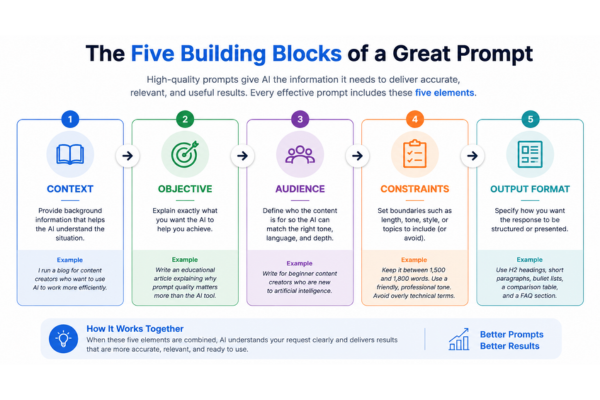
The Five Building Blocks of a Great Prompt
Although every project is different, most effective prompts share five essential elements. Together, these components give AI the information it needs to generate responses that are more accurate, relevant, and easier to refine.
| Element | Why It Matters |
| Context | Explains the situation or background. |
| Objective | Defines exactly what you want to achieve. |
| Audience | Identifies who the content is for. |
| Constraints | Sets limits such as tone, length, or style. |
| Output Format | Specifies how the response should be organized. |
Let’s look at each one in more detail.
1. Context
Context gives AI the background information it needs before attempting to answer your request.
Without context, the model has to make assumptions. Those assumptions may or may not match your intentions.
For example, compare these two prompts:
Without context
Write an article about productivity.
With context
I run a blog for beginner content creators who want to learn how artificial intelligence can improve their workflow. Write an educational article explaining how AI helps creators become more productive.
The second prompt immediately provides a clearer direction because the AI understands who the audience is and what problem the article should solve.
A few sentences of context can dramatically improve the quality of the response.
Strong prompts begin with strong information. Before asking AI to generate content, creators should gather reliable sources and understand the topic they want to cover. Our guide on AI Research Tools for Writers explains how AI can help organize research, verify information, and build stronger content foundations.
2. Objective
Once the AI understands the situation, it needs to know exactly what success looks like.
A vague request often produces a vague answer.
Instead of writing:
Help me with my blog.
Try something like:
Create a detailed outline for a 1,800-word article explaining why prompt quality matters more than choosing a different AI platform.
The objective tells the AI what you expect it to produce, reducing ambiguity and making the response more focused.
3. Audience
One of the most common mistakes beginners make is forgetting to define who the content is for.
An explanation written for software engineers will sound very different from one written for teachers, entrepreneurs, or first-time AI users.
For example:
Write for beginner bloggers who have never used AI before.
This single sentence changes the vocabulary, examples, and overall tone of the response.
Professional writers always think about their audience first—and AI should receive the same guidance.
4. Constraints
Constraints help AI stay focused.
Think of them as creative boundaries rather than limitations.
Useful constraints might include:
- Word count
- Reading level
- Tone of voice
- Formatting requirements
- Topics to include
- Topics to avoid
- SEO recommendations
For example:
Write in a friendly but professional tone. Keep the article between 1,500 and 1,800 words. Use H2 headings, short paragraphs, practical examples, and include a FAQ section.
The more clearly you define these expectations, the less editing you’ll need later.
5. Output Format
Finally, tell AI how you want the information presented.
Should it be:
- A blog article?
- A checklist?
- A comparison table?
- A step-by-step guide?
- A Frequently Asked Questions section?
Formatting instructions make the content easier to read and save valuable editing time.
Instead of asking:
Explain prompt engineering.
Try asking:
Explain prompt engineering in a beginner-friendly article using H2 headings, bullet points where appropriate, one comparison table, and a short FAQ at the end.
The content becomes much easier to publish with minimal revisions.
Weak Prompt vs. Strong Prompt
The difference between average and excellent AI-generated content often comes down to how the request is written.
Consider the following example.
| Weak Prompt | Strong Prompt |
| Write an article about AI. | Write a 1,600-word educational article for beginner content creators explaining why prompt quality matters more than choosing a different AI platform. Use clear language, practical examples, H2 headings, a comparison table, and finish with a FAQ section. |
Notice that the stronger prompt doesn’t rely on complicated language.
It simply removes uncertainty.
Rather than forcing the AI to guess, it provides the information needed to produce a response that is much closer to the creator’s expectations.
How Professional Creators Actually Use AI
One of the biggest myths about artificial intelligence is that professionals ask it to create an entire project with a single prompt.
In reality, experienced creators rarely work that way.
Instead, they divide complex projects into smaller, manageable tasks.
A typical workflow might look like this:
Research
↓
Generate ideas
↓
Build an outline
↓
Write the first draft
↓
Improve clarity and flow
↓
Optimize for SEO
↓
Review and edit manually
↓
Publish
At every stage, the creator remains in control.
AI speeds up repetitive tasks, suggests improvements, and helps organize information, but it does not replace human judgment.
The final decisions—what to publish, what to remove, and how to communicate with readers—still belong to the creator.
This collaborative approach usually produces better results than expecting AI to generate a perfect article from a single instruction.
Why Iteration Produces Better Results Than a Perfect First Prompt
Many people believe the secret to using AI effectively is writing one perfect prompt.
In practice, experienced creators work differently.
They understand that artificial intelligence performs best through conversation, not prediction.
The first response is rarely the final one.
Instead, it serves as a starting point that can be refined step by step.
Imagine you’re working with a professional editor.
You wouldn’t expect the first draft of an article to be ready for publication. You would discuss ideas, clarify objectives, adjust the tone, improve transitions, and remove unnecessary sections.
Working with AI follows the same principle.
Each follow-up instruction gives the model additional information, allowing it to produce increasingly accurate and useful responses.
For example, a creator might begin with:
Write an introduction explaining why prompt quality matters.
After reading the first draft, they could continue with instructions such as:
- Make the introduction more engaging.
- Use simpler language.
- Add a real-world example.
- Reduce repetition.
- Write for readers who are new to AI.
- End with a question that encourages them to keep reading.
Each revision improves the content without requiring the entire article to be rewritten.
This iterative process saves time while producing work that feels more thoughtful and polished.
Professional creators rarely expect perfection from the first response. Instead, they use AI as a collaborative partner that improves with every conversation.
AI Is Better at Collaboration Than Guessing
One reason prompt quality is so important is that AI has no way of knowing what you’re thinking.
If your request is too broad, the model fills in the missing details using patterns from its training data.
Sometimes those assumptions are useful.
Sometimes they lead the response in the wrong direction.
Providing additional context removes much of that uncertainty.
Think of AI as a highly knowledgeable assistant joining a project halfway through.
Without a briefing, the assistant can only make educated guesses.
With clear instructions, background information, and specific objectives, that same assistant can contribute far more effectively.
This is why experienced users spend less time searching for “magic prompts” and more time improving the conversation itself.
Common Prompt Mistakes
Even experienced AI users occasionally write prompts that produce disappointing results.
Fortunately, most problems are easy to fix once you recognize them.
Being Too Vague
Requests such as:
Write something about artificial intelligence.
provide almost no direction.
Instead, explain exactly what you want, who the audience is, and what problem the content should solve.
Forgetting the Audience
The same topic can be explained in very different ways depending on who is reading it.
Content written for software developers should not sound the same as content written for teachers, entrepreneurs, or beginner creators.
Defining your audience helps AI choose the appropriate language, examples, and level of detail.
Providing No Context
Context gives meaning to your request.
Without it, AI has to guess your goals.
Even two or three sentences describing your project can dramatically improve the response.
Asking for Too Much at Once
Some users try to generate an entire marketing campaign with a single prompt.
For example:
- Write a blog post.
- Create five social media posts.
- Suggest YouTube titles.
- Write an email sequence.
- Generate SEO keywords.
Although AI may attempt to complete all these tasks, the quality often suffers because the request is too broad.
Breaking large projects into smaller steps usually produces stronger results.
Accepting the First Response
This may be the most common mistake of all.
The first answer is rarely the best answer.
Professional creators refine, reorganize, simplify, expand, and improve AI-generated content before publishing it.
A few additional instructions often produce significantly better results than starting over with a completely new prompt.
Quick Tips for Writing Better AI Prompts
If you want better responses immediately, these simple habits make a noticeable difference.
✔ Start by explaining the context.
✔ Clearly define your objective.
✔ Describe your target audience.
✔ Specify the desired output format.
✔ Include important constraints such as tone, length, or structure.
✔ Review the first response instead of accepting it immediately.
✔ Continue the conversation by asking AI to improve specific sections.
✔ Treat AI as a creative assistant—not as a replacement for your own knowledge and judgment.
These practices require very little extra effort, yet they often lead to dramatically better results.
Prompt Writing Is Becoming a Core Digital Skill
As artificial intelligence becomes part of everyday work, the ability to write effective prompts is quickly becoming an essential professional skill.
This isn’t limited to writers or marketers.
Designers use prompts to generate visual concepts.
Teachers create lesson plans.
Entrepreneurs brainstorm business ideas.
Developers solve technical problems.
Customer support teams draft responses.
Researchers organize information.
Across every field, people are discovering that knowing how to ask is often just as important as knowing what to ask.
In many ways, prompt writing is becoming a modern form of communication.
The clearer your thinking, the clearer your instructions become.
And the clearer your instructions, the more valuable AI becomes as a creative partner.
Related Reading
If you’re looking to build a more efficient content creation workflow with artificial intelligence, these guides may also be helpful:
- AI Research Tools for Writers: How Content Creators Find Better Information Faster — Learn how AI simplifies research, organizes information, and helps writers build stronger, more accurate content.
- AI Voice Generator: How Creators Produce Professional Voiceovers Without a Recording Studio — Discover how AI-generated voices can streamline video production while maintaining professional quality.
- AI Presentation Maker: How Creators Build Professional Presentations Faster — Explore how AI presentation tools help organize ideas, design slides, and communicate information more effectively.
Each of these articles focuses on a different stage of the creative process, but they all share the same principle: AI produces better results when creators provide clear direction and apply thoughtful human judgment.
Learning from Trusted Sources
Artificial intelligence evolves rapidly, making it important to learn from reliable organizations as well as practical experience.
If you’d like to deepen your understanding of prompt writing and generative AI, these official resources are excellent starting points:
- Google AI – Prompt Design Guide
- Google Cloud – Introduction to Generative AI
- OpenAI – Prompt Engineering Best Practices
If you’d like to improve the way you write prompts, Google’s Prompt Design Strategies provides practical recommendations and real examples for creating clearer and more effective instructions when working with generative AI.
Learning from official documentation helps creators understand not only how AI works, but also how to communicate with these systems more effectively.
Key Takeaways
Before moving on to your next AI project, remember these principles:
✔ Prompt quality usually has a greater impact than changing AI platforms.
✔ Clear instructions produce clearer responses.
✔ Context helps AI understand your real objective.
✔ Defining your audience improves tone, vocabulary, and examples.
✔ Constraints such as length, style, and formatting reduce editing time.
✔ The first response is only the beginning—iteration is where the best results are created.
✔ AI is most effective when it supports human creativity rather than replacing it.
The Real Competitive Advantage
Artificial intelligence will continue to evolve.
New models will appear.
Current platforms will improve.
Today’s most popular AI assistant may eventually be replaced by something even more capable.
Technology never stands still.
But one advantage is likely to remain valuable regardless of which platform leads the market:
the ability to communicate clearly.
Great prompts are not created through complicated formulas or technical jargon.
They begin with clear thinking.
When you understand your objective, know your audience, provide meaningful context, and refine your instructions, artificial intelligence becomes far more than a content generator—it becomes a creative partner.
The creators who consistently produce valuable work are not necessarily those with access to the newest AI tools.
More often, they are the ones who know how to ask better questions, evaluate the answers critically, and combine AI with their own experience and creativity.
At ForgeCreatorAI, we believe artificial intelligence should enhance human potential, not replace it.
Technology can accelerate your workflow.
It can organize ideas, simplify repetitive tasks, and help overcome creative blocks.
But originality, judgment, empathy, and critical thinking remain uniquely human strengths.
Master prompt quality, and you’ll improve far more than your conversations with AI.
You’ll improve the way you think, communicate, and create.
And those skills will remain valuable no matter how artificial intelligence continues to evolve.
Frequently Asked Questions
What is prompt quality?
Prompt quality refers to how clearly and effectively you communicate your request to an AI system. A high-quality prompt provides context, defines the objective, identifies the audience, and explains how the response should be structured.
Why does prompt quality matter more than the AI tool?
For many content creation tasks, the instructions you provide have a greater impact on the final result than the specific AI platform you use. A well-structured prompt helps any modern AI generate more accurate and useful responses.
Do I need to learn prompt engineering?
Not necessarily. Most creators don’t need advanced technical knowledge. Learning how to write clear, well-organized instructions is usually enough to improve AI-generated content significantly.
Can the same prompt work on different AI platforms?
Yes. While different AI models have unique strengths, a well-written prompt generally performs better across multiple platforms than a vague prompt used with a more advanced model.
What are the five parts of an effective prompt?
An effective prompt typically includes:
- Context
- Objective
- Audience
- Constraints
- Output format
These five elements help AI understand exactly what you’re trying to achieve.
Final Thought
The best AI tool is not always the newest one.
More often, it’s the one you know how to use well.
Learning to write better prompts is an investment that improves every AI platform you use today—and every platform you’ll use in the future.
Better prompt quality creates better conversations, better workflows, and ultimately, better content.

ForgeCreatorAI Team writes about AI tools, content creation, digital workflows, and productivity systems for modern creators. Our goal is to simplify AI technology and help creators work smarter through practical tools and automation.