
AI background removers have changed the way content creators prepare professional visuals for blogs, videos, presentations, and social media. Great content isn’t just about ideas—it also depends on presentation.
Whether you’re publishing a blog post, designing a YouTube thumbnail, creating a presentation, or sharing content on social media, visuals are often the first thing people notice. A cluttered or distracting background can take attention away from your message, even when the content itself is excellent.
This is where an AI background remover becomes a valuable part of a creator’s workflow.
Instead of spending several minutes manually selecting objects, refining edges, and erasing backgrounds, modern AI tools can identify the main subject automatically and produce clean, professional-looking results in seconds.
For content creators, this means less time editing images and more time focusing on writing, filming, designing, or connecting with an audience.
In this guide, you’ll learn how AI background removers work, why they have become essential for creators, and how to use them effectively while maintaining a natural, professional look.
What Is an AI Background Remover?
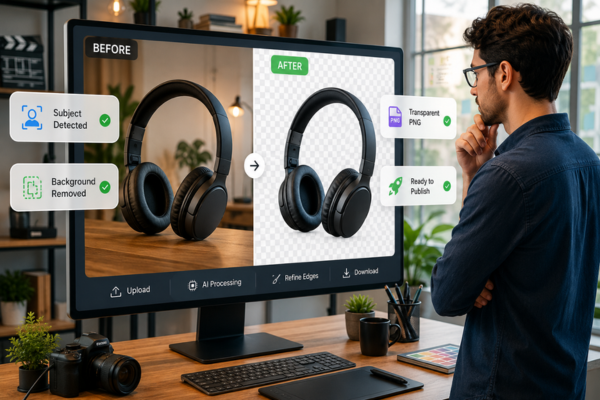
An AI background remover is a tool that automatically separates the main subject of an image from its background using artificial intelligence.
Unlike traditional photo editing software, which often requires manual selections and careful adjustments, AI analyzes the image, recognizes people or objects, and removes the surrounding background with minimal effort from the user.
The result is usually a transparent image that can be placed on a different background, incorporated into marketing materials, or used in completely new designs.
This technology has become especially valuable because creators now produce content for multiple platforms, each requiring different image sizes, layouts, and visual styles.
Instead of editing every image from scratch, AI speeds up one of the most repetitive parts of the creative process.
Why Clean Visuals Matter for Content Creators
People often decide whether to continue reading, watching, or clicking within just a few seconds.
A clean, professional image immediately communicates quality and helps the audience focus on the most important element of the content.
For creators, background removal isn’t only about making an image look better. It also improves communication by eliminating unnecessary distractions.
Clean visuals are especially useful for:
- YouTube thumbnails
- Blog featured images
- Social media graphics
- Online courses
- Product photos
- Presentations
- Digital marketing campaigns
- Portfolio websites
A simple background also creates greater visual consistency across an entire brand. When images share a similar style, websites, newsletters, and social media profiles appear more organized and professional.
As creators publish more frequently, maintaining this consistency becomes increasingly important.
Common Situations Where AI Background Removal Saves Time
Many creators don’t realize how often they perform the same editing task repeatedly.
Removing backgrounds manually from dozens of images every week quickly becomes one of the most time-consuming parts of content production.
An AI background remover can simplify everyday tasks such as:
- Creating custom YouTube thumbnails
- Preparing featured images for blog posts
- Designing presentation slides
- Editing speaker photos
- Producing online course materials
- Creating promotional graphics
- Updating profile pictures
- Preparing product images for online stores
Instead of treating background removal as a separate editing project, creators can complete the process in seconds and move directly to designing their final visual.
This small improvement often saves hours over the course of a month.
Why AI Is Better Than Traditional Manual Editing
Traditional background removal usually requires patience and technical knowledge.
Even experienced designers may spend several minutes carefully selecting subjects, especially when images contain hair, shadows, transparent objects, or complex edges.
AI changes this workflow completely.
Rather than asking users to draw selections manually, machine learning models identify the subject automatically by analyzing millions of visual patterns learned during training.
The software estimates where the foreground ends and the background begins, producing surprisingly accurate results with very little user input.
While manual editing still offers the highest level of precision for complex commercial projects, AI provides an excellent balance between speed, quality, and simplicity for most content creation tasks.
For bloggers, YouTubers, educators, freelancers, and small businesses, that balance is often exactly what’s needed.
How AI Background Removal Works
At first glance, removing a background may seem like a simple editing task. Behind the scenes, however, modern AI systems perform several complex steps in just a few seconds.
Instead of identifying colors alone, today’s AI models recognize shapes, objects, faces, clothing, and even fine details like hair or transparent materials using advanced computer vision technology. This allows them to separate the main subject from the background with much greater accuracy than traditional automatic selection tools.
Although each platform uses its own technology, the process usually follows a similar workflow.

For creators, the entire process often takes only a few seconds instead of several minutes of manual editing.
Benefits of Using an AI Background Remover
Background removal is about much more than making an image look cleaner. It improves efficiency across the entire content creation process.
Some of the biggest advantages include:
- Faster image editing
- More professional-looking visuals
- Consistent branding across platforms
- Less time spent on repetitive tasks
- Better-looking thumbnails and featured images
- Easier content repurposing
- Improved workflow for teams and freelancers
The comparison below highlights how AI simplifies a task that once required significant editing experience.
| Traditional Editing | AI Background Removal |
| Manual selections | Automatic subject detection |
| Several minutes per image | Usually completed in seconds |
| Requires editing skills | Beginner-friendly |
| Difficult edge refinement | Automatic edge improvement |
| Repetitive workflow | Fast and consistent results |
For creators producing content every week, these small time savings quickly become significant.
Common Ways Creators Use AI Background Removers
Background removal has become part of many creative workflows, even when the audience doesn’t notice it.
Bloggers often remove distracting backgrounds from featured images to create cleaner article covers.
For creators building visual presentations, combining clean images with an AI Presentation Maker can make slides more engaging and professional.
YouTubers use transparent cutouts to build eye-catching thumbnails that immediately highlight the presenter or the main topic.
Course creators prepare professional instructor photos for lessons, presentations, and promotional materials.
Freelancers design client proposals with consistent visuals that reinforce their personal brand.
Small businesses improve product photography without investing in expensive studio equipment.
Social media managers create reusable image assets that can easily be adapted for different platforms and campaigns.
In each case, the goal isn’t simply removing a background—it’s making visual communication clearer and more effective.
AI Background Removal Is More Than a Design Tool
Many people think background removal is useful only for graphic designers.
In reality, it has become a productivity tool for anyone who creates digital content.
A writer can quickly prepare blog illustrations.
A teacher can improve educational presentations.
A marketer can create advertisements faster.
A podcaster can produce promotional graphics.
A YouTube creator can design more attractive thumbnails.
An online store owner can standardize hundreds of product photos.
The technology supports creativity by reducing repetitive editing work, allowing creators to spend more time developing ideas instead of performing manual tasks.
As visual content continues to dominate online communication, this type of automation becomes valuable across almost every creative profession.
Choosing the Right AI Background Remover
Not every AI background remover is designed for the same type of work.
Some prioritize speed, making them ideal for social media creators who need quick results. Others focus on precision, which is especially important when working with portraits, product photography, or images containing complex details like hair, fur, or transparent objects.
Before choosing a tool, consider factors such as:
- Background removal accuracy
- Edge refinement quality
- Support for transparent PNG exports
- High-resolution downloads
- Batch image processing
- Integration with other creative tools
- Privacy and data protection
- Ease of use
The best solution isn’t always the one with the most features. It’s the one that fits naturally into your workflow and helps you produce high-quality content more efficiently.
Common Mistakes to Avoid
AI makes background removal much easier, but the final result still depends on how the original image is prepared.
One common mistake is starting with a low-quality photo. If the subject is blurry, poorly lit, or hidden behind other objects, even advanced AI models may struggle to separate it cleanly from the background.
Another frequent issue is replacing the background with something that doesn’t match the purpose of the image. A dramatic background might look impressive, but it can distract viewers from the message you’re trying to communicate.
Creators should also avoid relying entirely on automation. Even when AI produces excellent results, it’s worth taking a few seconds to check fine details around hair, hands, clothing, or accessories before publishing.
Small adjustments often make the difference between an image that looks artificial and one that appears professionally edited.
Best Practices for Better Results
Getting the best results doesn’t require advanced editing skills. A few simple habits can dramatically improve image quality.
Whenever possible:
- Use high-resolution original photos.
- Choose images with good lighting.
- Keep enough space around the subject when taking the picture.
- Review edges before exporting the final image.
- Select a background that matches your brand identity.
- Save transparent versions for future projects.
It’s also helpful to organize edited images into folders by project or campaign. This makes it easier to reuse visual assets across blog posts, presentations, videos, and social media without repeating the editing process.
Consistency is just as important as quality. When images share the same visual style, your content becomes instantly more recognizable.
The Future of AI Background Removal
Background removal is evolving far beyond simply deleting unwanted scenery.
New AI models are becoming better at understanding depth, lighting, shadows, reflections, and object relationships. Instead of separating subjects from their backgrounds, they are beginning to recreate natural-looking environments that blend seamlessly with the original image.
Future tools are also expected to improve video editing by removing or replacing backgrounds frame by frame with greater accuracy, making professional-looking production accessible to individual creators and small teams.
At the same time, AI will likely become more integrated into complete creative workflows. Rather than switching between multiple applications, creators may soon generate, edit, enhance, and publish visual content from a single workspace powered by artificial intelligence.
For content creators, this means spending less time on repetitive editing and more time developing ideas, telling stories, and connecting with their audiences.
Making Every Image Count
High-quality visuals have become an essential part of digital content, regardless of the platform or audience.
An AI background remover helps creators eliminate one of the most repetitive editing tasks, allowing them to focus on what truly matters: creating valuable content.
Whether you’re publishing blog posts, designing YouTube thumbnails, building online courses, or promoting products, clean images help communicate ideas more clearly and create a stronger first impression.
Artificial intelligence isn’t replacing creativity. Instead, it’s reducing the time spent on repetitive work so creators can invest more energy into planning, storytelling, and connecting with their audience.
As AI-powered creative tools continue to evolve, background removal will become an even more seamless part of the content creation process, helping creators produce professional visuals faster than ever before.
Frequently Asked Questions
Can an AI background remover replace professional photo editing?
For most everyday content creation tasks, yes. AI background removers produce excellent results quickly and are more than sufficient for blog graphics, social media posts, presentations, and YouTube thumbnails. Professional editing may still be preferable for complex commercial photography.
Does AI background removal work with complex images?
Modern AI performs well with many complex images, including portraits, products, and objects with detailed edges. However, photos with poor lighting or very busy backgrounds may still require small manual adjustments.
Can I use AI background removers for product photography?
Absolutely. Many online stores use AI background removal to create clean, consistent product images that look more professional while saving significant editing time.
Why are AI background removers becoming so popular?
Creators publish more visual content than ever before. AI dramatically reduces editing time while helping maintain a consistent visual style across blogs, websites, presentations, videos, and social media platforms.

ForgeCreatorAI Team writes about AI tools, content creation, digital workflows, and productivity systems for modern creators. Our goal is to simplify AI technology and help creators work smarter through practical tools and automation.